

Almost every discussion about M365 Copilot starts in the wrong place. It starts at «do we want this». It is already running. Anyone on an eligible Microsoft 365 plan already has Copilot Chat in the house, without an order, without a project and without a steering committee.
Microsoft puts it this way: «Copilot Chat (Basic) is the standalone baseline experience included with eligible Microsoft 365 licenses.» (Source: Microsoft Learn, What is Microsoft Copilot, as of 17 November 2026) So an AI is already sitting at the desks. What is open is which tier goes to whom, and what that tier may read. The groundwork before that, clear permissions and a tidy file store, we wrote down under M365 Copilot. This piece is about the layer above: the licence, and what it actually buys.
What is the difference between Copilot Chat and M365 Copilot?
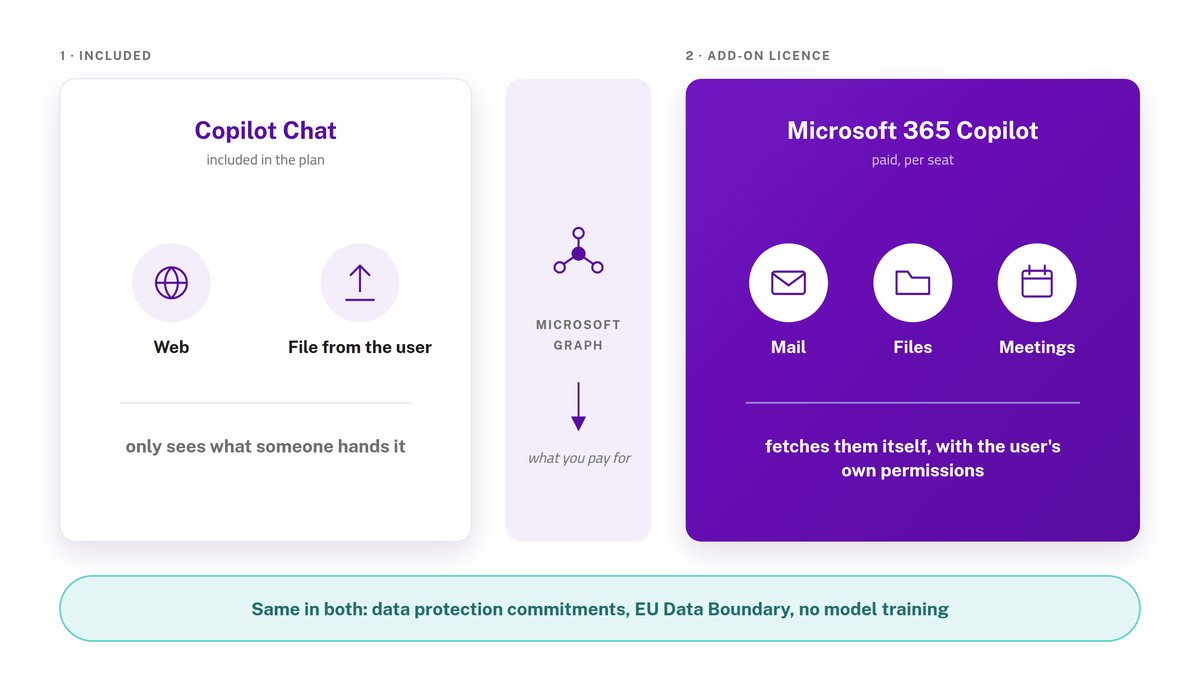
Copilot Chat is included in eligible Microsoft 365 plans and answers from web data. It uses company data only when the user supplies it, or inside the user's own mailbox when the chat runs in Outlook. The paid tier, Microsoft 365 Copilot, fetches mail, files and meetings by itself through Microsoft Graph.
That is the whole dividing line, and it is sharper than most comparison tables suggest. The documentation states it as a plain negative: «Copilot Chat (Basic) and Microsoft 365 Copilot (Basic) can't use organizational data via Microsoft Graph when interacting with Copilot Chat.» For the top tier it says the opposite: «uses both web and organizational data via Microsoft Graph and pulls information automatically».
One exception belongs to that line, otherwise it gets too clean. In Outlook the included tier reaches further than you would think. There it can access mail, calendar, meetings, chats and files the user has worked with or received. What it does not get, Microsoft records in the same section: «Access to full work data as part of Work IQ and semantic indexing is only available for users with the Microsoft Copilot license.» The difference therefore sits between lexical search inside the user's own mailbox and semantic search across everything that person may open in the tenant.
By the way, if the product names are confusing you right now, that is not on you. Microsoft renamed them and records in its own privacy documentation: «Microsoft 365 Copilot is now named Microsoft Copilot, and Microsoft 365 Copilot Chat is now named Microsoft Copilot Chat.» (Source: Microsoft Learn, Microsoft Copilot Chat Privacy and Protections, as of 18 August 2026) On invoices, in the admin center and in contracts both names still run in parallel.
Three tiers, one single dividing line
Microsoft today lists three licence tiers plus usage-based billing. The names are confusing, because two of them are called «Basic» and still mean different things.
Copilot Chat (Basic). Included. Chat in the browser, in the Copilot app, in Edge, Outlook and Teams. Answers from the web. Company data only when the user actively supplies it.
Microsoft 365 Copilot (Basic). These are users without the add-on licence who can still use Copilot features in Word, Excel, PowerPoint and OneNote. For access to company data the same limit applies as above: no Graph.
Microsoft 365 Copilot (Premium). The add-on licence. Automatic grounding in Microsoft Graph and Work IQ, Copilot Search, semantic indexing, plus SharePoint Advanced Management and the advanced admin reports. Work IQ can be switched on and off, so even a paid licence can run without grounding in company data.
Above that sits usage-based billing for Cowork, Code and Autopilot. It requires the Premium licence and is charged by consumption, so it is a second cost pool next to the seat price.
What is identical across all three tiers surprises most people: Enterprise Data Protection applies in all three, the EU Data Boundary applies to processing in all three, and prompts and responses are not used to train the models in any tier. Switzerland is included here, even though the name says EU. The boundary covers the EU and EFTA, and Switzerland is an EFTA country; for Microsoft 365, Microsoft states that «customers with a sign-up location in a country or region in the EU or EFTA» are in scope, with Multi-Geo customers excluded. (Source: Microsoft Learn, What is the EU Data Boundary, as of 21 July 2026) Contractually and technically the included tier stands on the same foundation. It simply does not know your data.
What does M365 Copilot cost?
For Switzerland, Microsoft lists CHF 24.30 per user and month with annual billing, excluding VAT, and shows Copilot Chat on the same page as «included». (Source: Microsoft, Copilot pricing for enterprise, retrieved 25 November 2026) Depending on plan and contract the number will look different for you; what binds is what your contract says.
The seat price is rarely the decision. At 60 employees it is about the multiplication, and that comes out of a habit. In our experience, SMEs buy licences across the board, because exceptions cost more in administration than the licence they would save. For Office that calculation holds. For Copilot it changes the character of the decision, because the seat brings along a machine that reads by itself whatever that person may open in the tenant.
Buying across the board is therefore also a decision about visibility. That is not an argument against buying. It is an argument for turning the order around and starting with the roles whose work sits in your own documents.
Where the included tier is not free
The uncomfortable side of the included tier runs in the other direction. Inwards, Copilot Chat does not know your data. Outwards, it sends something.
Copilot Chat grounds its answers in the web, and for that it generates a search query to Bing from the prompt. Microsoft describes precisely what does not travel with it: no user or tenant identifiers, not the whole prompt (unless it is very short), no complete uploaded files. What does travel is a few terms generated from the prompt, and if needed terms from an attached file.
Two sentences in the same documentation matter more to a Swiss company than anything else on that page. First: «Web search queries sent from Copilot Chat to Bing are not EUDB-compliant.» Second, on Microsoft's role in the web search part: «Microsoft acts as an independent data controller responsible for complying with all applicable laws and controller obligations.»
Translated: for this one part of the flow Microsoft is not your processor, it is a controller in its own right. Swiss data protection law separates the two roles precisely. A controller under Art. 5 lit. j FADP is whoever «decides on the purpose and means of the processing», a processor under lit. k is whoever «processes personal data on behalf of the controller». (Source: Fedlex, Data Protection Act SR 235.1) Your data processing agreement with Microsoft addresses the second role. The duties under Art. 9 FADP, making sure that only what you may process yourself is processed there, bite exactly there and not in the web search part.
In practice that does not mean «switch Copilot Chat off». It means web search is a switch somebody sets on purpose, not a detail. Microsoft provides the «Allow web search in Copilot» policy for it, and according to the documentation it applies across all licence tiers. There is a second point many only discover after the first incident. Prompts and responses are logged and stored in the user's Exchange mailbox, in the included tier as well. What that means for retention, eDiscovery and a data subject request is covered in what Copilot stores and how long it stays.
Who needs the paid tier?
The add-on licence pays off where the work sits in your own documents, mail and meetings. Where someone mostly drafts, researches or calculates and hands over their template anyway, the included tier delivers the same benefit at a price of zero. Three questions sort this out, and they go role by role.
Where does the material this person works with come from? If the answer is «from two files I know», uploading is enough. If it is «from six project folders, two mailboxes and the minutes from last autumn», Graph is the difference between useful and nice.
Then the breadth. How widely may this person read today? A Premium licence turns existing permissions into a query that takes seconds. For a clerk with cleanly cut access that is unproblematic. With permissions grown over the years across every team site, the licence order and the permission cleanup belong in the same week.
That leaves the question of what happens after the pilot. A licence that disappears into the noise for a quarter helped nobody and still showed up on the invoice. That is why in our mandates around AI governance and secure AI adoption every paid tier gets a task with a name, for example the monthly report or the quote review. After four weeks we look at whether that task runs differently.
If you are weighing this next to another tool, the same logic shows up in our comparison of ChatGPT Team and ChatGPT Enterprise. There too the higher tier mostly buys control and reach over company data.
Count first, then buy
Three steps, and none of them needs a budget. Count first who already has Copilot Chat today. That is not the licence list, that is the list of everyone on an eligible plan. Then set the web search switch and write retention into the usage rule you need anyway. The paid tier comes last, for the two or three roles whose material sits in the tenant, with one named task per licence.
After that the conversation with the vendor is a procurement exercise and no longer a debate about principles. And you have the answer to the question in the next customer questionnaire: which AI runs here, on what data, with what permissions. It is the same order in which every AI consulting engagement with us starts, first the work and the data, then the tool.
A free initial conversation is usually enough to settle the seat count before it lands in the contract. Book one here. If it turns out the included tier is enough for you, we will say so too.
Frequently asked questions
Is Copilot Chat included in Microsoft 365?
Yes. Microsoft lists Copilot Chat as the baseline experience included at no extra cost with eligible Microsoft 365 plans. It answers from web data and uses company data only when the user supplies it. Enterprise Data Protection and the EU Data Boundary apply there just as in the paid tier.
What is the difference between Copilot Chat and M365 Copilot?
Copilot Chat answers from the web and sees company data only when somebody supplies it or the chat runs in the user's own Outlook mailbox. The paid tier, Microsoft 365 Copilot, fetches mail, files and meetings itself through Microsoft Graph, with the access rights of the signed-in user.
What does M365 Copilot cost per user?
For Switzerland Microsoft lists CHF 24.30 per user and month with annual billing, excluding VAT, as of 25 November 2026. Depending on plan and contract the amount differs. Copilot Chat costs nothing extra, while Cowork, Code and Autopilot are charged separately by consumption.