
Alexis M.,
Too Long; Didn't Read
There are four IT lies you hear all the time: "Cloud saves money" (often it doesn't). "More tools = more security" (the opposite is true). "Everything is running smoothly" (red flag). "We are vendor-neutral" (mostly false). This article reveals what lies beneath – and which questions you should ask to uncover the truth.

The IT Lies Everyone Tells You
Every IT decision you make is influenced by someone who benefits from it.
This isn't malicious. It's simply... business.
The cloud provider wants you to migrate. The security vendor wants you to buy their tool. The IT partner wants you to keep needing them. The consultant wants you to hire them for the next project.
And they all tell you stories. Some of them are true. Many are... optimistically phrased.
Here are the four biggest IT lies we keep hearing from our clients – and what really lies behind them.
Lie #1: "The Cloud Saves Money"
What you hear: "Cloud migration will significantly reduce your IT costs."
What really happens: 30-35% of the cloud budget is wasted. Due to unused resources, incorrect configurations, and forgotten test environments.
The numbers are brutal:
25-35% budget overrun in the first 12 months after migration (the budget was too optimistic)
Only 6% of companies report zero avoidable cloud expenses
48% cite "rising cloud costs" as their biggest IT challenge
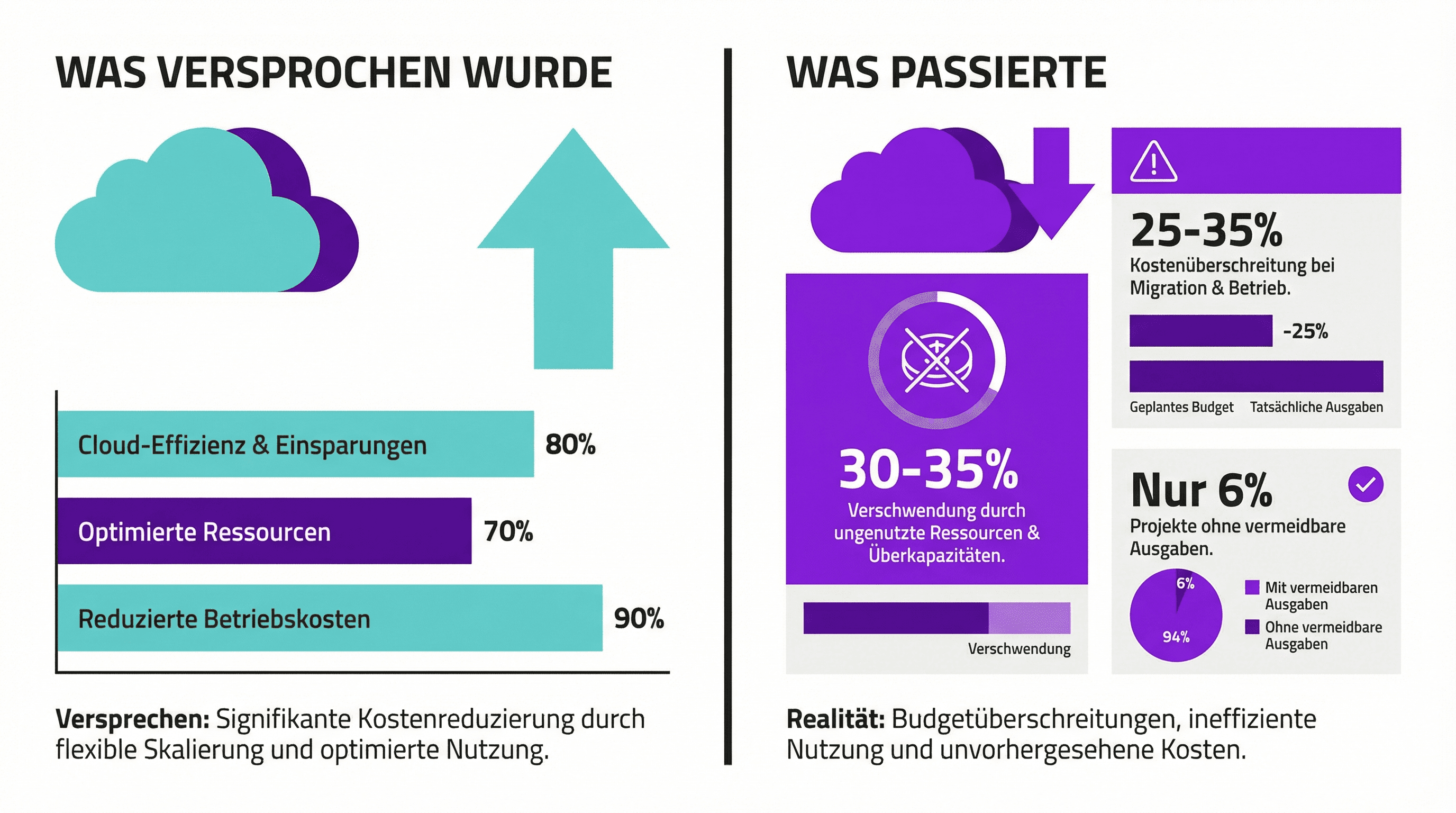
Figure: The reality of cloud migration – what was promised vs. what happened
The uncomfortable truth: Cloud can save money. With the right governance, continuous optimization, and someone actively monitoring. But without that? You often pay more than before – only now it's monthly instead of one-time.
The irony: The cloud bill is finally transparent. You see exactly what you're paying. On-premises costs were hidden – in depreciation, maintenance contracts, electricity costs, personnel expenses.
Transparency is good. But transparency ≠ lower costs.
The questions you should be asking:
Exactly what will we save after migration – and in what time frame?
Who continuously monitors our cloud costs?
What happens if costs are higher than planned?
Lie #2: "More Security Tools = More Security"
What you hear: "With this additional tool, we'll close the security gap."
What really happens: The average company has 45-83 different security tools. From 29 different vendors. And 65% say: That's too many.
Here's where it gets interesting:
Only 10-20% of purchased security technology is actually used
71% of organizations struggle with managing their complex security landscape
41% say: Poor tool integration is a direct security risk
The trend is reversing, by the way: 75% of companies are actively consolidating their security tools (by 2025). In 2020, it was 29%. The insight is catching on.
The uncomfortable truth: Every new tool is another attack vector. Every tool requires updates, configuration, monitoring, know-how. No one – truly no one – correctly configures 83 tools.
The result? Alert fatigue. Thousands of alerts per day. Real threats get lost in the noise.
The security vendor sells you tools. Not security. There's a difference.
The questions you should be asking:
How many security tools do we currently use?
Which ones do we actively use?
What would happen if we turned off half of them?
Lie #3: "Everything Is Great"
What you hear: "Don’t worry, everything is under control."
What you should hear: Specific updates. Proactive reports. Early warnings.
If your IT partner or department regularly tells you "all is well" – without details, without context, without numbers – that’s a red flag.
The warning signs:
Hard to reach or slow to respond
Problems reported only when they become critical
No regular status updates
The same issues keep recurring
Surprises on the bill
The uncomfortable truth: Good IT partners report problems BEFORE they escalate. They tell you: "Hey, yesterday's backup didn't work – we’re looking into it." Or: "These three servers haven’t received updates for 60 days – here’s our plan."
"All is well" without details isn’t information. It’s a warning sign.
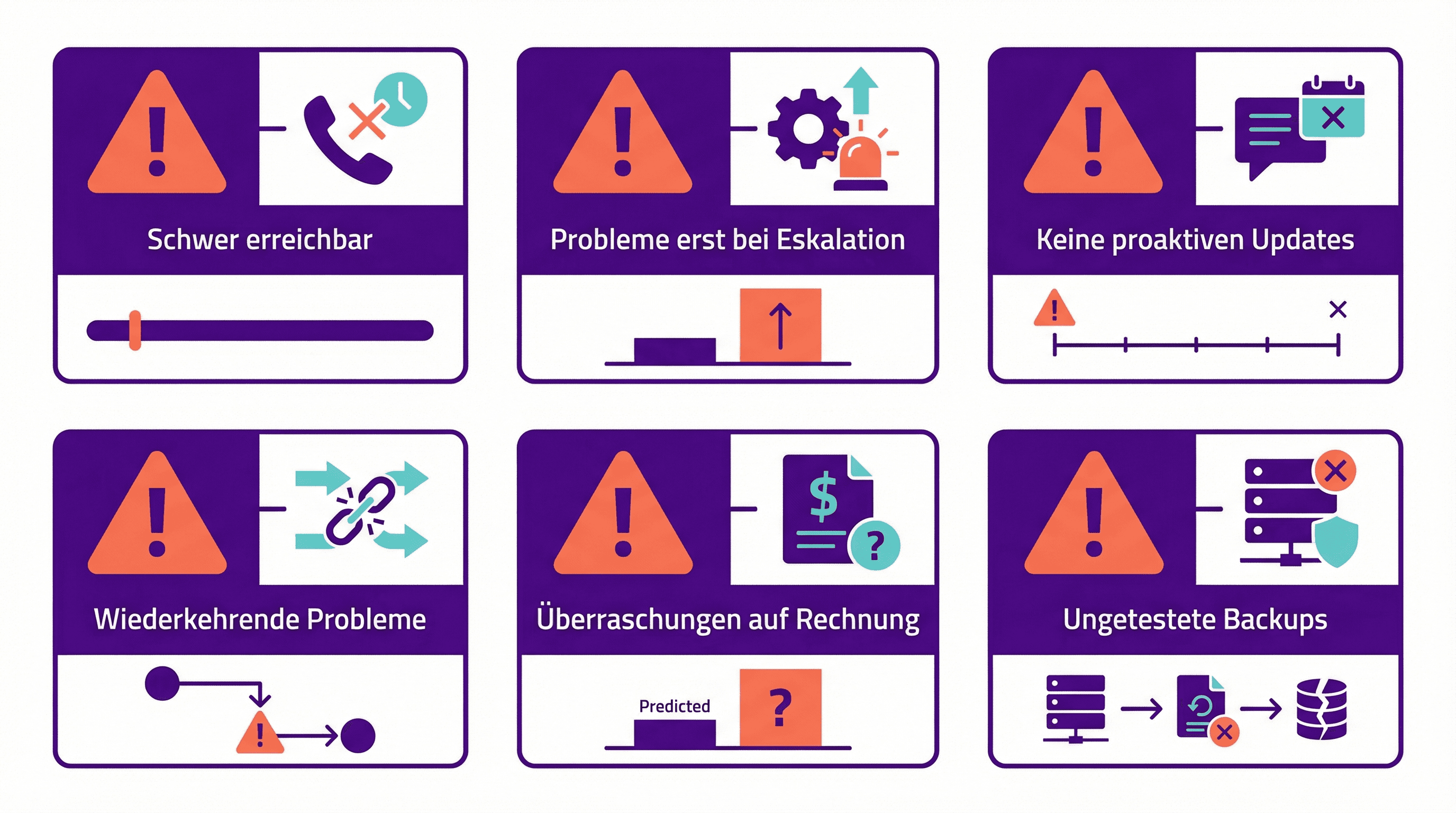
Figure: Warning signs that "all is well" doesn’t mean all is well
The questions you should be asking:
When was the last backup restore tested?
How many security incidents have there been this year?
Which patches are still pending?
Which systems run without vendor support?
If the answers are vague or cause discomfort – then you know.
Lie #4: "We're Vendor Neutral"
What you hear: "We only recommend what's best for you."
What often is true: "We recommend what's most lucrative for us."
Most IT consultants have partnerships with vendors. This isn’t inherently bad – but it influences their recommendations. Always.
How the conflicts work:
Kickbacks and commissions: Consultants get paid for product recommendations
Implementation revenue: Large teams for certain vendors = tendency towards those recommendations
Referral fees: Financial incentives for specific vendor deals
Excessive praise for a vendor? Can indicate a partnership. Excessive criticism of another? Can mean there's no business relationship.
The uncomfortable truth: True vendor neutrality is rare. Because it's less lucrative. The big consulting firms all have their implementation practices – and these practices must be kept busy.
When someone says "we're neutral" – ask for proof.
The questions you should be asking:
Do you have partnerships with the vendors you recommend?
Do you receive commissions or referral fees?
What percentage of your revenue comes from vendors vs. clients?
Why do you recommend this vendor over Alternative X?
How to Spot the Lies
After hundreds of conversations with executives and IT managers, we’ve identified a few patterns:
Be cautious of:
Overly simple answers to complex questions
Promises without specific figures
Pressure to decide quickly
Criticism of all alternatives
"Everybody does it this way"
Have trust in:
"It depends" (with an explanation of what it depends on)
"I don’t know, but I’ll find out"
Concrete references with measurable results
Willingness to discuss alternatives
"In your case, I would actually advise against it"
What You Can Do
You don’t have to question everything. But a few strategic questions can reveal a lot:
Area | Question | A good answer includes... |
|---|---|---|
Cloud Costs | "What exactly are we saving?" | Specific amounts, time frames |
Security | "How many tools do we have?" | Exact number, list, assessment |
IT Status | "When was the last backup test?" | Date, result, next schedule |
Neutrality | "What partnerships do you have?" | Transparent listing |
(Speaking of neutrality: We have no vendor partnerships. No kickbacks. No implementation practices that need to be kept busy. That's why we can say what we really think. If you ever need an honest assessment of your IT situation – get in touch. We'll tell you what we see. Not what you want to hear.)